Friday, August 3, 2012

silverlight mvvm light + WCF RIA

Step 1: Create an empty Solution.


Step 2: Add an Empty Web Project:


Step 3: Add Silverlight Class Library (works on SL5)


Step 4: Add MVVM light 5


Step 5: Link .Web to Silverlight Application:

.Web -> Properties -> Silverlight -> Add SilverLight Project


remove .aspx start file generated by the link (in this example MvvmRIASample.SLTestPage.aspx)
and rename MvvmRIASample.SLTestPage.html to index.html and make it start page.

Step 6: Add Folder Models to .Web (where the .emdx is created)


COMPILE!!!

Step 7: Add Folder Service to .Web


Step 8: Link .Core to .Web (WCF RIA Service Link) through .Core Properties
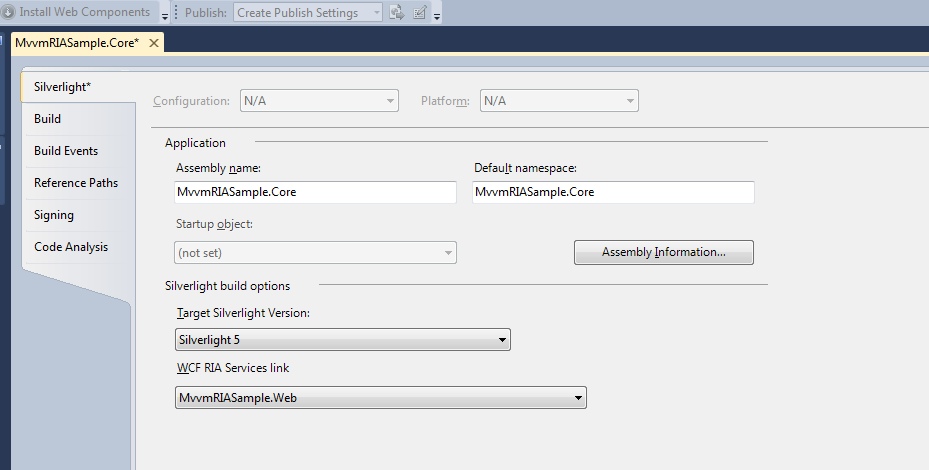
Step 9:  Make .SL depend on .Core


Step 10: Add the same references that .Core has to .SL

- System.ComponentModel.DataAnnotations
- System.ServiceModel
- System.ServiceModel.DomainServices.Client
- System.ServiceModel.DomainServices.Client.Web
- System.ServiceModel.Web.Extensions

Step 11: Make the previous .DLL do NOT copy in LOCAL (in .Core) to avoid duplication in the final executable.

Step 12: Modify MainViewModel.cs (to test that everything is working correctly)

adding the following:

using MvvmRIASample.Web.Models;
using MvvmRIASample.Web.Services;
using System.Linq;


        #region Welcome
        public const string WelcomePropertyName = "Welcome";

        private string _welcome = "";

        public string Welcome
        {
            get
            {
                return _welcome;
            }

            set
            {
                if (_welcome == value)
                {
                    return;
                }

                var oldValue = _welcome;
                _welcome = value;

                RaisePropertyChanged(WelcomePropertyName);

            }
        }
        #endregion


        public MainViewModel()
        {
            if (IsInDesignMode)
            {
                Welcome = "Design Data";
            }
            else
            {
                AWDomainServices context = new AWDomainServices();
                context.Load(context.GetProductsQuery(), (result =>
                {
                    if (!result.HasError)
                    {
                        Product first = result.Entities.FirstOrDefault();
                        if (first != null)
                        {
                            Welcome = first.Name;
                        }
                    }
                }), null);
            }
        }


Add Authentication Service


Step 13: Add the following in web.config in .Web project


<!--<system.web>-->
<!--  <compilation debug="true" targetFramework="4.0" />-->
  <authentication mode="Forms"></authentication>
  <roleManager enabled="true"></roleManager>
  <profile enabled="true">
    <properties>
      <add type="System.Int32" defaultValue="10" name="DefaultRows"/> <!-- test -->
    </properties>
  </profile>
<!-- </system.web>-->


Step 14: Add "Authentication Domain Service" to .Web (Services\AuthenticationDomainService.cs)


Step 15: Oepn AuthenticationDomainService.cs and add the following


[EnableClientAccess]
public class AuthenticationDomainService : AuthenticationBase<User>
{
}

public class User : UserBase
{
    public int DefaultRows { get; set; }
}

And build the solution.

Step 16: Create an Test User using ASP.NET Web Site Administration Tool

Step 17: Manually create the class WebContext.cs in .Core

    public sealed partial class WebContext: WebContextBase
    {
        partial void OnCreated();

        public WebContext()
        {
            this.OnCreated();
        }

        public new static WebContext Current
        {
            get
            {
                return ((WebContext)(WebContextBase.Current));
            }
        }

        public new User User
        {
            get
            {
                return ((User)(base.User));
            }
        }
    }

Step 18: Configuring the Client for Authentication
in App.xaml.c 
        public App()
        {
            Startup += Application_Startup;
            Exit += Application_Exit;
            UnhandledException += Application_UnhandledException;

            InitializeComponent();

            /////////////////////// added
            WebContext webContext = new WebContext();
            webContext.Authentication = new FormsAuthentication();
            this.ApplicationLifetimeObjects.Add(webContext);
        }

        private void Application_Startup(object sender, StartupEventArgs e)
        {
            /// Added Code
            ((WebAuthenticationService)WebContext.Current.Authentication).DomainContext = new MultiTier.Web.AuthenticationDomainContext();
            this.Resources.Add("WebContext", WebContext.Current);
            //////////////////

            RootVisual = new MainPage();
            DispatcherHelper.Initialize();
        }

Step 19: Adding Login Functionality to the Client (step 19 is to add some code to see it works)
Add the following snippet to MainPage.xaml: 
            <TextBlock x:Name="WelcomeText" Visibility="Collapsed"></TextBlock>
            <HyperlinkButton x:Name="LogoutButton" 
                 Content="Logout" 
                 Click="LogoutButton_Click" 
                 Visibility="Collapsed">
            </HyperlinkButton>
            <Border x:Name="LoginBorder" 
        Margin="10,10,0,0" 
        BorderThickness="2" 
        BorderBrush="Black" 
        HorizontalAlignment="Left" 
        CornerRadius="15" 
        Padding="10" 
        Background="BlanchedAlmond" 
        Width="300">
                <Grid HorizontalAlignment="Left">
                    <Grid.RowDefinitions>
                        <RowDefinition></RowDefinition>
                        <RowDefinition Height="30" ></RowDefinition>
                        <RowDefinition Height="30"></RowDefinition>
                        <RowDefinition></RowDefinition>
                        <RowDefinition></RowDefinition>
                    </Grid.RowDefinitions>
                    <Grid.ColumnDefinitions>
                        <ColumnDefinition></ColumnDefinition>
                        <ColumnDefinition></ColumnDefinition>
                    </Grid.ColumnDefinitions>
                    <TextBlock Grid.Row="0" 
                   Grid.ColumnSpan="2" 
                   Grid.Column="0" 
                   FontWeight="Bold" 
                   HorizontalAlignment="Left" 
                   VerticalAlignment="Center" 
                   Text="Log In Existing User">
                    </TextBlock>
                    <TextBlock Grid.Row="1" 
                   Grid.Column="0" 
                   HorizontalAlignment="Right" 
                   VerticalAlignment="Center" 
                   Text="User Name: ">
                    </TextBlock>
                    <TextBox x:Name="UserName" 
                 VerticalAlignment="Center" 
                 Grid.Row="1" 
                 Grid.Column="1"  
                 Width="100">
                    </TextBox>
                    <TextBlock Grid.Row="2" 
                   HorizontalAlignment="Right" 
                   Grid.Column="0" 
                   VerticalAlignment="Center" 
                   Text="Password: ">
                    </TextBlock>
                    <PasswordBox x:Name="Password" 
                     VerticalAlignment="Center" 
                     Grid.Row="2" 
                     Grid.Column="1"  
                     Width="100">
                    </PasswordBox>
                    <TextBlock x:Name="LoginResult" 
                   TextWrapping="Wrap" 
                   Visibility="Collapsed" 
                   Grid.Row="3" 
                   Grid.ColumnSpan="2" 
                   Foreground="Red">
                    </TextBlock>
                    <Button x:Name="LoginButton" 
                Margin="0,5,0,0" 
                Grid.Row="4" 
                Grid.Column="1" 
                Content="Log In" 
                Click="LoginButton_Click">
                    </Button>
                </Grid>
            </Border>


and following codes to MainPage.xaml.cs


        protected void OnNavigatedTo(NavigationEventArgs e)
        {
            SetControlVisibility(WebContext.Current.User.IsAuthenticated);
        }

        private void LoginButton_Click(object sender, RoutedEventArgs e)
        {
            LoginParameters lp = new LoginParameters(UserName.Text, Password.Password);
            WebContext.Current.Authentication.Login(lp, this.LoginOperation_Completed, null);
            LoginButton.IsEnabled = false;
            LoginResult.Text = "";
        }

        private void LoginOperation_Completed(LoginOperation lo)
        {
            if (lo.HasError)
            {
                LoginResult.Text = lo.Error.Message;
                LoginResult.Visibility = System.Windows.Visibility.Visible;
                lo.MarkErrorAsHandled();
            }
            else if (lo.LoginSuccess == false)
            {
                LoginResult.Text = "Login failed. Please check user name and password.";
                LoginResult.Visibility = System.Windows.Visibility.Visible;
            }
            else if (lo.LoginSuccess == true)
            {
                SetControlVisibility(true);
            }
            LoginButton.IsEnabled = true;
        }

        private void SetControlVisibility(bool isAuthenticated)
        {
            if (isAuthenticated)
            {
                LoginBorder.Visibility = System.Windows.Visibility.Collapsed;
                WelcomeText.Text = "Welcome " + WebContext.Current.User.Name;
                WelcomeText.Visibility = System.Windows.Visibility.Visible;
                LogoutButton.Visibility = System.Windows.Visibility.Visible;
            }
            else
            {
                LoginBorder.Visibility = System.Windows.Visibility.Visible;
                WelcomeText.Visibility = System.Windows.Visibility.Collapsed;
                LogoutButton.Visibility = System.Windows.Visibility.Collapsed;
            }
        }

        private void LogoutButton_Click(object sender, RoutedEventArgs e)
        {
            WebContext.Current.Authentication.Logout(this.LogoutOperation_Completed, null);
        }

        private void LogoutOperation_Completed(LogoutOperation lo)
        {

            if (!lo.HasError)
            {
                SetControlVisibility(false);
            }
            else
            {
                //ErrorWindow ew = new ErrorWindow("Logout failed.", "Please try logging out again.");
                //ew.Show();
                lo.MarkErrorAsHandled();
            }
        }


Saturday, July 28, 2012

DataGrid/Textbox Master/Detail in XAML

MainPage.xaml


    <Grid x:Name="LayoutRoot" Background="White">
        <StackPanel Orientation="Horizontal">
            <sdk:DataGrid Name="grid" Margin="10" AutoGenerateColumns="False">
                <sdk:DataGrid.Columns>
                    <sdk:DataGridTextColumn Header="Name" Binding="{Binding Name}" />
                    <sdk:DataGridTextColumn Header="Age" Binding="{Binding Age}" />
                </sdk:DataGrid.Columns>
            </sdk:DataGrid>


            <StackPanel>
                <sdk:DataGrid Name="gBooks" Margin="10" AutoGenerateColumns="False" DataContext="{Binding SelectedItem, ElementName=grid}" ItemsSource="{Binding Books}">
                    <sdk:DataGrid.Columns>
                        <sdk:DataGridTextColumn Header="Title" Binding="{Binding Title}" />
                        <sdk:DataGridTextColumn Header="Code" Binding="{Binding Code}" />
                    </sdk:DataGrid.Columns>
                </sdk:DataGrid>
                <StackPanel DataContext="{Binding SelectedItem, ElementName=grid}" Orientation="Horizontal">
                    <TextBlock Text="{Binding Name}"  />
                    <CheckBox IsChecked="{Binding isMale}" />
                </StackPanel>
            </StackPanel>
        </StackPanel>
    </Grid>


CodeBehind:


    public partial class MainPage : UserControl
    {
        public MainPage()
        {
            InitializeComponent();
            this.Loaded += new RoutedEventHandler(MainPage_Loaded);
            
        }


        void MainPage_Loaded(object sender, RoutedEventArgs e)
        {
            grid.ItemsSource = GridData.GetData();
        }
    }


    public class GridData
    {
        public string Name { get; set; }
        public int Age { get; set; }
        public bool isMale { get; set; }
        public IEnumerable<Book> Books { get; set; }


        public class Book
        {
            public string Title { get; set; }
            public string Code { get; set; }
        };


        public static ObservableCollection<GridData> GetData()
        {
            ObservableCollection<GridData> data = new ObservableCollection<GridData>
            {
                new GridData { Name = "John Doe", Age = 30, isMale = true, 
                    Books = new List<Book> {
                        new Book {Title = "suits", Code = "123"},
                        new Book {Title = "Condors 1", Code = "113"}
                    } 
                },
                new GridData { Name = "Jane Doe", Age = 32, isMale = false },
                new GridData { Name = "Jason Smith", Age = 54, isMale = true },
                new GridData { Name = "Kayli Jayne", Age = 25, isMale = false}
            };


            return data;
        }
    }

Saturday, July 21, 2012

windows azure user

create login username with password = 'password'; (on master)
create user username for login username; (on database)
exec sp_addrolemember 'db_owner', 'username'

Saturday, July 14, 2012

Longest Increasing Sequence C#


        static public int LongestIncreasingSeq(int[] s) {
            int[] l = new int[s.Length];  // DP table for max length[i]
            int[] p = new int[s.Length];  // DP table for predeccesor[i]
            int max = int.MinValue;

            l[0] = 1;

            for (int i=0; i<s.Length; i++)
                p[i] = -1;

            for (int i = 1; i < s.Length; i++)
            {
                l[i] = 1;
                for (int j = 0; j < i; j++)
                {
                    if (s[j] < s[i] && l[j] + 1 > l[i])
                    {
                        l[i] = l[j] + 1;
                        p[i] = j;
                        if (l[i] > max)
                            max = l[i];
                    }
                }
            }
            return max;
        }

Linear Partition in C#


        static public void partition(int[] s, int n, int k) {
            Console.Write("{");
            Utils.printArray(s);
            Console.WriteLine("}");

            int MAXN = s.Length;
            int MAXK = 3;

            int[,] m = new int[MAXN, MAXK];     // DP table for values.
            int[,] d = new int[MAXN, MAXK];     // DP table for dividers.
            int[] p =  new int[MAXN];           // prefix sums array.
            int cost;

            p[0] = s[0];
            for (int i = 1; i < n; i++) p[i] = p[i - 1] + s[i];

            for (int i = 0; i < n; i++) m[i, 0] = p[i];
            for (int j = 0; j < k; j++) m[0, j] = s[0];
                       
            for (int i = 1; i < n; i++)
                for (int j = 1; j < k; j++)
                {
                    m[i, j] = int.MaxValue;
                    for (int x = 0; x <= (i - 1); x++)
                    {
                        cost = Math.Max(m[x, j - 1], p[i] - p[x]);
                        if (m[i, j] > cost)
                        {
                            m[i, j] = cost;
                            d[i, j] = x + 1;
                        }
                    }
                }

            Console.Write("{");
            reconstruct_particion(s, d, n, k);
            Console.Write("} ");
        }

        private static void reconstruct_particion(int[] s, int[,] d, int n, int k)
        {
            if (k == 1)
            {              
                print_books(s, 0, n);
            }
            else
            {
                reconstruct_particion(s, d, d[n - 1, k - 1], k - 1);
                print_books(s, d[n - 1, k - 1], n);
            }
        }

        private static void print_books(int[] s, int start, int end)
        {
            Console.Write("{");
            for (int i = start; i < end; i++)
                Console.Write(" {0} ", s[i]);
            Console.Write("} ");
        }

Thursday, June 28, 2012


There is a known issue in the WCF Services SDK which may soon cause you at least a really annoying message; "this operation is not supported for a relative uri". While it is not fatal and you can ignore it – as a matter of good coding, I tend to get rid of as many warning messages as possible. To fix it, open your machine.config (both x86 and x64 version), and delete the following section:

C:\Windows\Microsoft.NET\Framework\v4.0.30319\Config\machine.config
C:\Windows\Microsoft.NET\Framework64\v4.0.30319\Config\machine.config
<endpoint address="" binding="netTcpRelayBinding" 
 contract="IMetadataExchange" name="sb" />

Wednesday, January 18, 2012

Presenting Storyboard View Controllers Programmatically

Although the storyboard runtime usually handles transitions between view controllers, you can also trigger segues programmatically from your code. You might do so when setting up the segue in Interface Builder is not possible, such as when using accelerometer events to trigger the transition. There are several options for transitioning to a new view controller:

  • If a storyboard file contains an existing segue between the current view controller and the destination view controller (perhaps triggered by some other control in the view controller), you can trigger that segue programmatically using the performSegueWithIdentifier:sender:method of UIViewController.
  • If there is no segue between the view controllers but the destination view controller is defined in the storyboard file, first load the view controller programmatically using the instantiateViewControllerWithIdentifier: method of UIStoryboard. Then present the view controller using any of the existing programmatic means, such as by pushing it on a navigation stack.
  • If the destination view controller is not in the storyboard file, create it programmatically and present it as described in View Controller Programming Guide for iOS.

Friday, December 16, 2011

iphone element sizes

Core Elements:
Carrier Status bar - 320x20
UIView - 320x460
UINavigationBar - 320x44
UITabBar - 320x49
UISearchBar - 320x44
UIToolBar - 320x44
Data Input:
UIPickerView - 320x216
UIDatePicker - 320x216
UIKeyboard - 320x216
Buttons:
UISegmentedControl - 320x44
UIButton xx37
Fields:
UITextField - xx37
UISwitch 94x27
UISlider - xx23
Indicators:
UIProgressView -xx9
UIActivityIndicatorView - 37x37
UIPageControl - 38x36

Thursday, August 4, 2011

UIEdgeInsets.

Shrinking, Expanding, Edge Insetting
If you need to shrink a CGRect by a certain value horizontally and vertically you could do so by modifying the structure members themselves. But way more elegant is to use the provided convenient macro CGRectInset. Positive values will decrease the size evenly for the new rectangle to be centered in the old one. Negative values by the same token will increase it.
CGRect aRectangle = CGRectMake(0,0, 100, 200);
CGRect smallerRectangle = CGRectInset(aRectangle, 10, 20);
// result origin (10, 20) and size (80, 160)
This method is fine for 80% of use cases, but sometimes you want to apply different insets for each edge. Imagine, if you will that you want, to have a property contentInsets that would specify the distance a view content should have from each border. The structure of choice for this is UIEdgeInsets(top, left, bottom, right), and of course, there is also a matching Make macro available.
Once you have both you can easily apply the insets to your rect to receive the finally content rectangle. The macro for this purpose is UIEdgeInsetsInsetRect, would you have guessed?
CGRect rect = CGRectMake(0, 0, 100, 200);
UIEdgeInsets contentInsets = UIEdgeInsetsMake(10, 20, 30, 40);

CGRect result = UIEdgeInsetsInsetRect(rect, contentInsets);
NSLog(@"x: %f, y: %f, width: %f, height: %f",
result.origin.x, result.origin.y,
result.size.width, result.size.height);
// x: 20.000000, y: 10.000000, width: 40.000000, height: 160.000000
Actually the above NSLog is how I have been inspecting CGRect for the past 2 years. Right after I published the first version of this blog post I was pointed out to me that there is an even more elegant method: NSStringFromCGRect. Wow, a third as much key strokes.
NSLog(@"%@", NSStringFromCGRect(result));
// {{20, 10}, {40, 160}}
Wway more elegant, I’m sure you’ll agree? (Thanks Matt and Thomas But that’s the point of making these write ups. You learn a bit from writing them and you learn a bit more when other pros tell you the mistakes you made.

from: http://www.cocoanetics.com/2010/07/cgrect-tricks/

Wednesday, July 13, 2011

programmatically determine app is running in the iphone simulator?


NSString *model= [[UIDevice currentDevice] model];
NSString *iPhoneSimulator = @”iPhone Simulator”;
if ([model compare:iPhoneSimulator] == NSOrderedSame){
//device is simulator
}

CryptographicException APNS

[CryptographicException: An internal error occurred.
]
   System.Security.Cryptography.CryptographicException.ThrowCryptographicException(Int32 hr) +33
   System.Security.Cryptography.X509Certificates.X509Utils._LoadCertFromBlob(Byte[] rawData, IntPtr password, UInt32 dwFlags, Boolean persistKeySet, SafeCertContextHandle& pCertCtx) +0
   System.Security.Cryptography.X509Certificates.X509Certificate.LoadCertificateFromBlob(Byte[] rawData, Object password, X509KeyStorageFlags keyStorageFlags) +203
   System.Security.Cryptography.X509Certificates.X509Certificate..ctor(Byte[] rawData, String password) +80
   System.Security.Cryptography.X509Certificates.X509Certificate2..ctor(Byte[] rawData, String password) +79
   JdSoft.Apple.Apns.Notifications.NotificationConnection.start(String p12File, String p12FilePassword) +224
   JdSoft.Apple.Apns.Notifications.NotificationService.set_Connections(Int32 value) +119
   JdSoft.Apple.Apns.Notifications.NotificationService..ctor(Boolean sandbox, String p12File, String p12FilePassword, Int32 connections) +211
   APN.Page_Load(Object sender, EventArgs e) in c:\inetpub\wwwroot\iPhone\APN.aspx.cs:51
   System.Web.Util.CalliHelper.EventArgFunctionCaller(IntPtr fp, Object o, Object t, EventArgs e) +14
   System.Web.Util.CalliEventHandlerDelegateProxy.Callback(Object sender, EventArgs e) +35
   System.Web.UI.Control.OnLoad(EventArgs e) +91
   System.Web.UI.Control.LoadRecursive() +74
   System.Web.UI.Page.ProcessRequestMain(Boolean includeStagesBeforeAsyncPoint, Boolean includeStagesAfterAsyncPoint) +2207
----
use code in NotificationConnection.cs: 

//certificate = new X509Certificate2(System.IO.File.ReadAllBytes(p12File), p12FilePassword);
certificate = new X509Certificate2(System.IO.File.ReadAllBytes(p12File), p12FilePassword, X509KeyStorageFlags.MachineKeySet | X509KeyStorageFlags.PersistKeySet | X509KeyStorageFlags.Exportable);